
grok-coding-observatory · Guide
See what your AI coding agent is doing, live
You hand a task to Claude Code, Codex, Cursor or another agent, and a few minutes later it says it's done. What actually happened in between? grok-coding-observatory shows you, edit by edit, while it happens.
# in the folder of your repo:
npx -y github:Eeliya/grok-coding-observatory   # open http://localhost:4477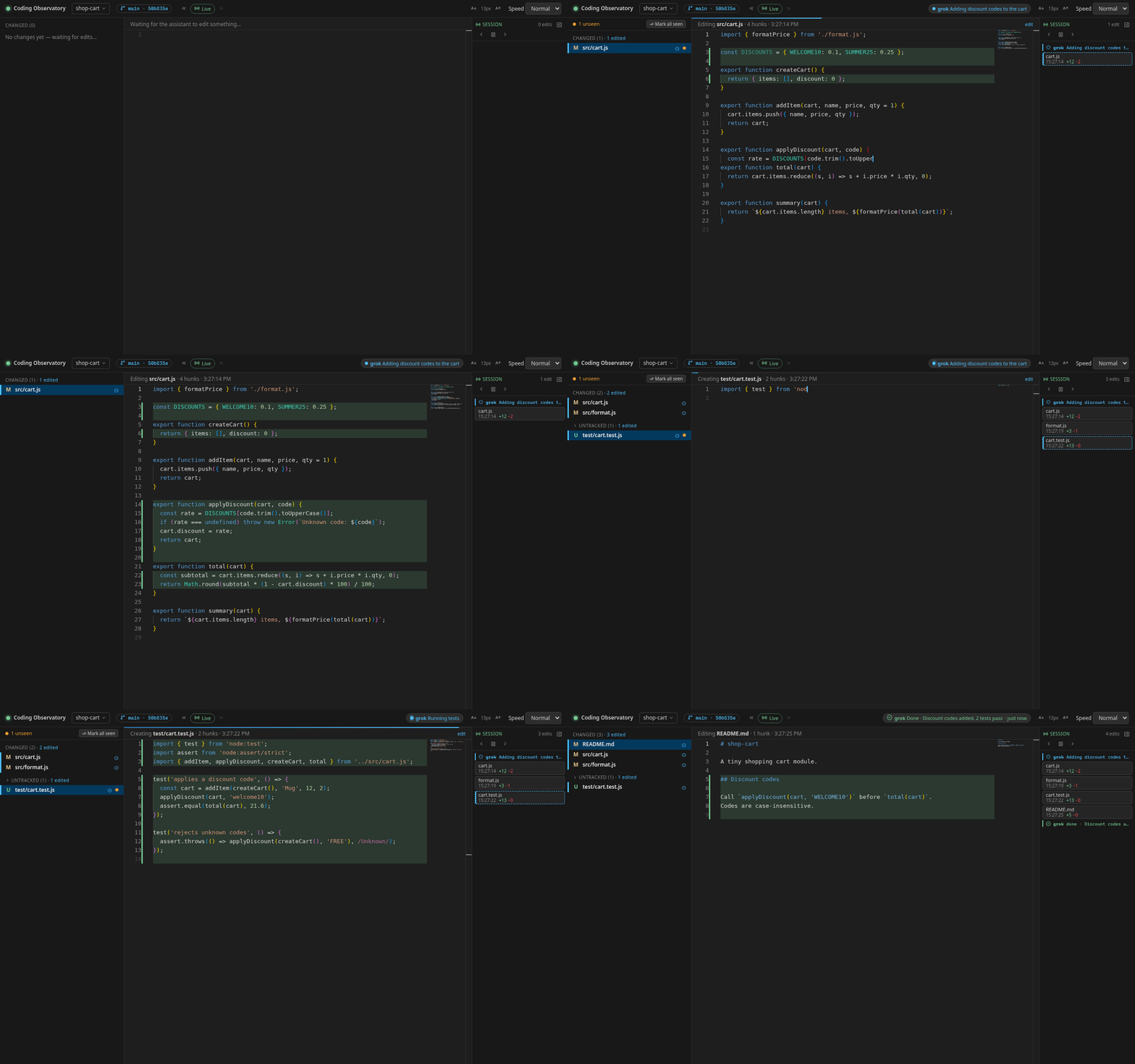
The problem: agents work out of sight
Coding agents are fast and busy. They open a dozen files, rewrite a function, change
their mind, run the tests and fix something else. In the chat you mostly see a summary
at the end, and the terminal scrolls by faster than you can read. If you want to catch a
wrong turn early, or simply understand what changed, you end up running
git diff over and over.
How the observatory helps
grok-coding-observatory is a small open-source web app that runs on your computer and watches the git repo your agent is working in. Each time a file is saved, the page jumps to the changed lines, highlights what was removed and types in what was added, like a short video of the edit. Nothing is skipped: if several edits land at once they queue up and play in order.
- The Session timeline on the right lists every edit with its time and lines added and removed. Click one to replay it.
- Unseen dots mark files that changed while you were away, so coming back after a coffee takes seconds.
- The status chip shows whether the agent says it is working (and on what) or done, if the agent reports it.
- Commit playback replays the agent's commits file by file afterwards.
Set it up in three steps
-
Start it in your repo
In a terminal, in the folder of the project your agent is editing, run
npx -y github:Eeliya/grok-coding-observatory. You need Node.js 22.6+ and git. On Windows, run it inside WSL. -
Open the page
Open http://localhost:4477 and keep the tab next to your agent, ideally on a second screen. It only listens on your own machine.
-
Let the agent work
Give your agent its task as usual. Every file it saves replays in the browser, and the Session timeline on the right fills up.
Which agents does it work with?
Any agent that edits files in a git repo on your machine: Claude Code, Codex CLI, Cursor, Aider, GitHub Copilot's agent mode, Grok Bot, or a script you wrote yourself. The observatory doesn't plug into the agent at all. It watches the files and asks git what changed, so there is nothing to install inside your tools.
The status chip is the one optional extra. Any agent that can write a small JSON file
can report "working on X" and "done". Paste this into your AGENTS.md (or
CLAUDE.md, or your tool's rules file):
## Status for grok-coding-observatory
When you start a task, before a long command (tests, build, install) and when
you finish, run this from the repo root (use "done" and a one-line summary
at the end):

d="$(git rev-parse --path-format=absolute --git-path observatory/status)" && mkdir -p "$d" && echo '{"state":"working","message":"Running tests","agent":"agent"}' > "$d/agent.json"
The file lives inside the .git folder, so it is never committed. The full
format is in the
agent status protocol.
What it doesn't show
The observatory shows code changes, not the conversation: no prompts, tool calls or token costs. If you want those, use it next to your agent's own logs or a session dashboard. What it gives you is the part that ends up in your repo.
FAQ
Does it slow down or interfere with my agent?
No. It only reads: it watches the files and runs read-only git commands. It never writes to your work tree and never takes git locks, so your agent works exactly as before.
Does my code leave my computer?
No. The server listens on 127.0.0.1 only and never sends your code anywhere. The page loads the Monaco editor and an icon font from a CDN, nothing else.
Can I watch an agent that runs in the cloud?
Only once its changes are on your machine. The observatory watches a local git repo, so remote edits show up when you pull or apply them.
Is it free?
Yes. It is open source under the MIT License.