
grok-coding-observatory · Guide
A live diff viewer for Claude Code
Claude Code edits your files directly. grok-coding-observatory puts those edits in a browser tab next to your terminal and replays each one as it lands, so you can follow along without stopping Claude.
# in the folder of your repo:
npx -y github:Eeliya/grok-coding-observatory   # open http://localhost:4477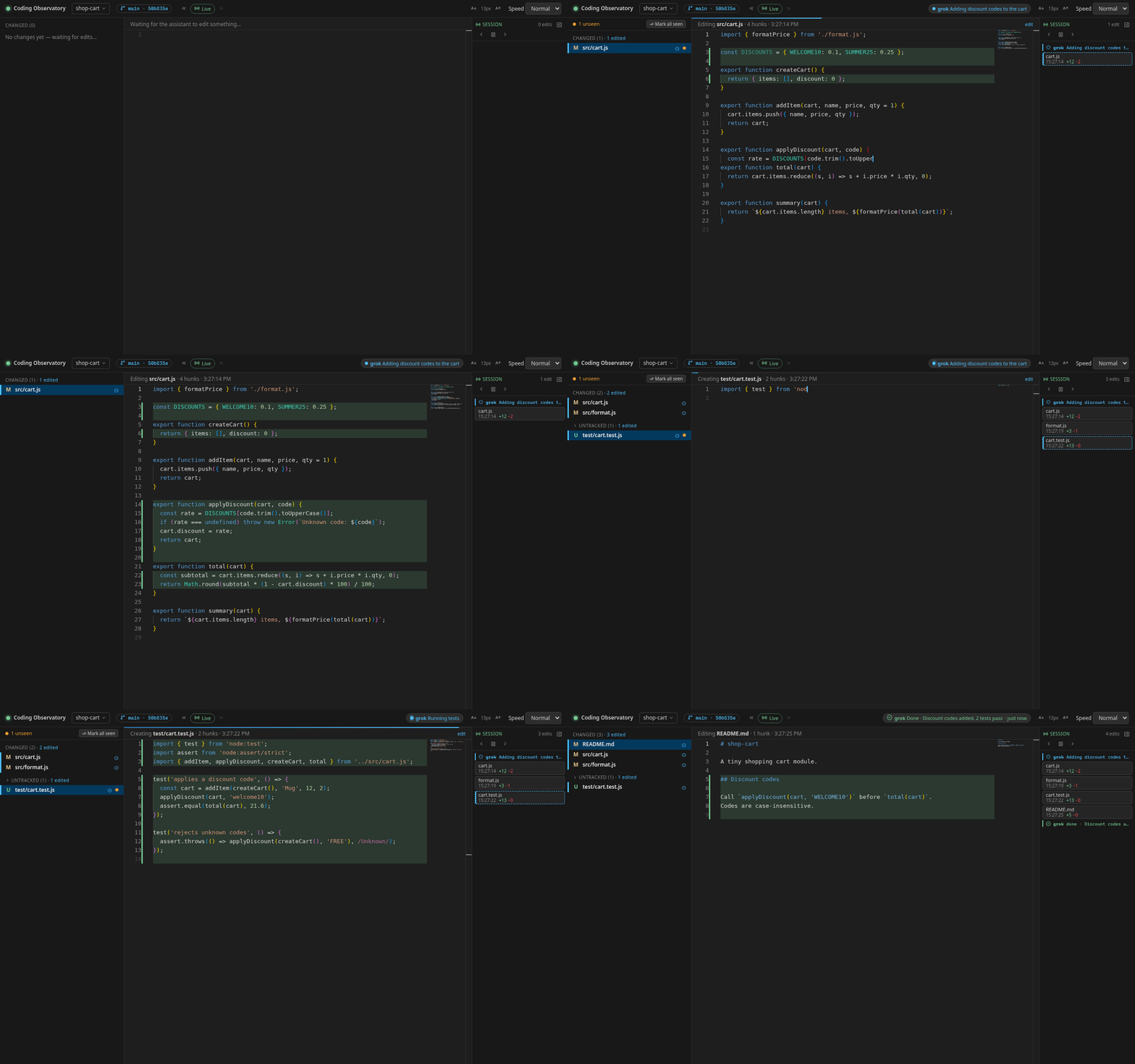
Why a separate diff view?
Claude Code's /diff command shows what changed in your working tree, which
is great for a check at the end. While Claude is busy, though, you often want a calmer
view: one that keeps every intermediate edit, works on a second screen and doesn't
compete with the conversation for terminal space.
The observatory is that view. It watches your repo through git and the file system and
replays each saved change in a Monaco editor: it scrolls to the lines, marks what was
removed and types what was added. The Session timeline keeps every edit in order with
its time and +/− lines, so you can click back to the one that made you frown. A file
list shows everything that differs from HEAD, with a side-by-side diff per
file.
Use it with Claude Code in three steps
-
Start it in your repo
In a terminal, in the folder where you run
claude, runnpx -y github:Eeliya/grok-coding-observatory. You need Node.js 22.6+ and git. On Windows, run it inside WSL. -
Open the page
Open http://localhost:4477 and keep the tab next to your agent, ideally on a second screen. It only listens on your own machine.
-
Let the agent work
Give your agent its task as usual. Every file it saves replays in the browser, and the Session timeline on the right fills up. Commits Claude makes show up as markers you can replay.
Show "working" and "done" with Claude Code hooks
Claude Code can run shell commands at fixed points through
hooks. Three hooks are enough to
drive the status chip: working when you send a prompt, a refresh after each tool call,
and done when Claude stops. Save this script as
.claude/hooks/observatory-status.sh:
#!/bin/sh
# Report Claude Code's status to grok-coding-observatory
d="$(git -C "${CLAUDE_PROJECT_DIR:-.}" rev-parse --path-format=absolute --git-path observatory/status 2>/dev/null)" || exit 0
mkdir -p "$d" && printf '{"state":"%s","message":"%s","agent":"claude"}\n' "$1" "$2" > "$d/claude.json"
Then add the hooks to .claude/settings.local.json (or
settings.json):
{
  "hooks": {
    "UserPromptSubmit": [{ "hooks": [{ "type": "command",
      "command": "sh \"$CLAUDE_PROJECT_DIR\"/.claude/hooks/observatory-status.sh working 'Working on your prompt'" }] }],
    "PostToolUse": [{ "hooks": [{ "type": "command",
      "command": "sh \"$CLAUDE_PROJECT_DIR\"/.claude/hooks/observatory-status.sh working 'Working on your prompt'" }] }],
    "Stop": [{ "hooks": [{ "type": "command",
      "command": "sh \"$CLAUDE_PROJECT_DIR\"/.claude/hooks/observatory-status.sh done 'Finished, your turn'" }] }]
  }
}
Prefer messages that say what Claude is doing? Skip the hooks and add the snippet from
the
agent status protocol
to your CLAUDE.md; Claude then writes its own "Running tests" or
"Refactoring the parser" updates.
FAQ
Do I need a Claude Code plugin or MCP server?
No. The observatory watches your files and git, so Claude Code needs no integration. Hooks are only needed for the optional status chip.
Does it work with Claude Code in VS Code or the desktop app?
Yes, as long as Claude edits files in a git repo on your machine. The observatory doesn't care which tool saved the file. Cloud sessions show up once you pull their changes.
Will it see edits Claude makes with shell commands, not just the Edit tool?
Yes. It watches the file system, so a change made by sed, a formatter, a code generator or Claude's Edit tool all replay the same way. Git-ignored files are left out.
Can it undo Claude's changes?
No, it is read-only on purpose. Use git (git restore, git checkout -p) or Claude Code's /rewind to undo changes.