
grok-coding-observatory · Guide
Watch Cursor's agent change your code, edit by edit
Cursor shows the agent's diffs inside the editor. grok-coding-observatory adds an independent view straight from your files: every save replays in a browser tab, in order, with a timeline you can scroll back through.
# in the folder of your repo:
npx -y github:Eeliya/grok-coding-observatory   # open http://localhost:4477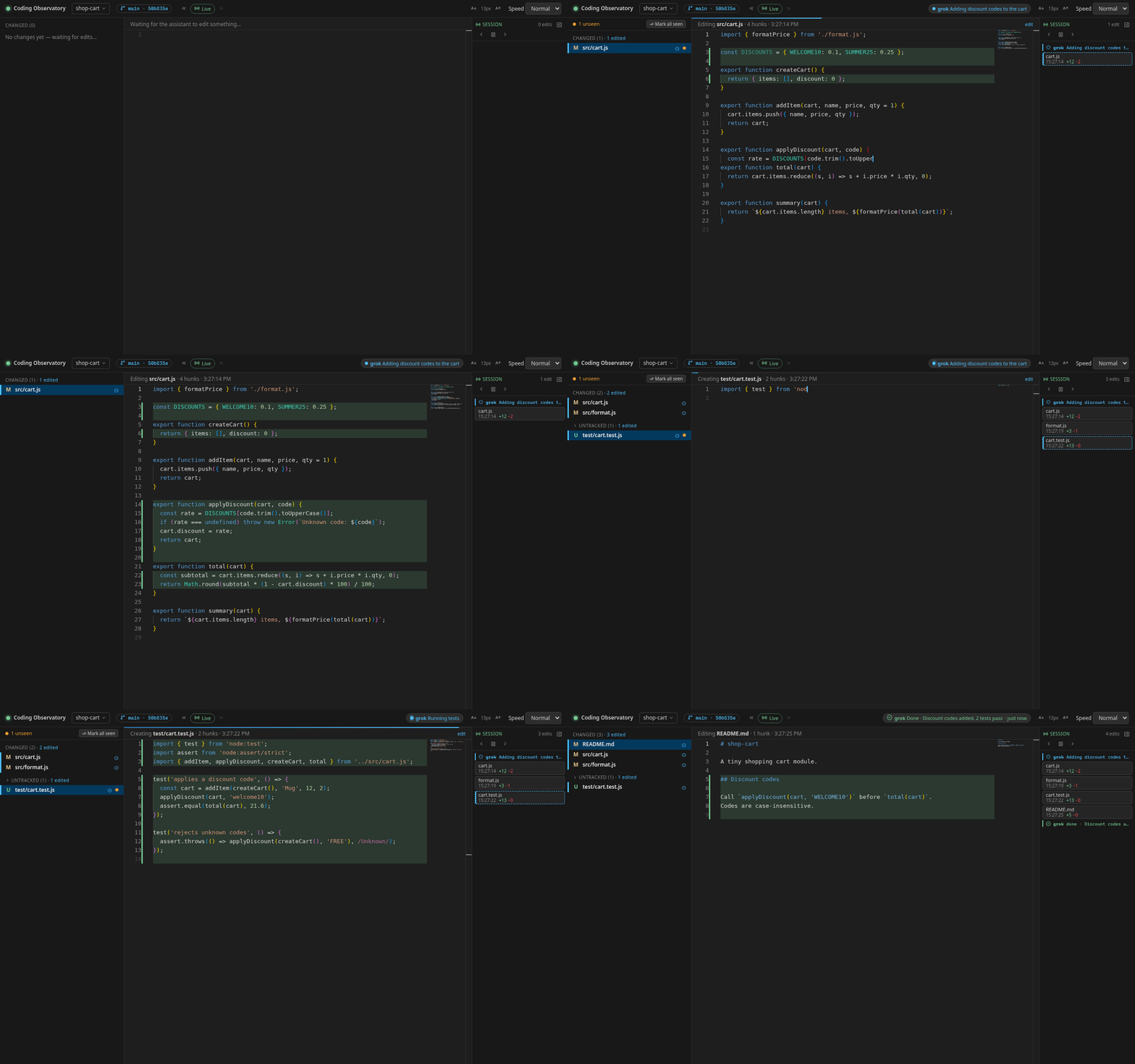
Why watch Cursor from outside Cursor?
Cursor's review view is built for accepting and rejecting changes. When the agent runs a longer task, it helps to have a second, calmer view that simply records what happens on disk, whether the change came from the agent's edits, a terminal command it ran, a formatter, or you.
The observatory reads your repo through git and the file system, so it sees every saved
change no matter which tool made it. Each one replays in a Monaco editor: it scrolls to
the changed lines, marks what was removed and types what was added. The Session timeline
keeps every edit with its time and +/− lines, unseen dots flag files that changed while
you looked elsewhere, and a side-by-side diff against HEAD is one click
away. It runs in any browser, so it's easy to park on a second monitor.
Use it with Cursor in three steps
-
Start it in your repo
In a terminal, in the folder you opened in Cursor (Cursor's built-in terminal works), run
npx -y github:Eeliya/grok-coding-observatory. You need Node.js 22.6+ and git. On Windows, run it inside WSL. -
Open the page
Open http://localhost:4477 and keep the tab next to your agent, ideally on a second screen. It only listens on your own machine.
-
Let the agent work
Give your agent its task as usual. Every file it saves replays in the browser, and the Session timeline on the right fills up. Pause playback with Space and step through edits with the arrow keys.
Show the agent's status in the header
Cursor's agent follows project instructions in AGENTS.md or in a rule under
.cursor/rules. Add this and it writes a small status file whenever it
starts something or finishes; the observatory shows it as a chip with a pulsing dot
while it works and a ✓ summary when it's done:
## Status for grok-coding-observatory
When you start a task, before a long command (tests, build, install) and when
you finish, run this from the repo root (use "done" and a one-line summary
at the end):

d="$(git rev-parse --path-format=absolute --git-path observatory/status)" && mkdir -p "$d" && echo '{"state":"working","message":"Running tests","agent":"cursor"}' > "$d/cursor.json"
If Cursor asks before running terminal commands, allow this one or the chip stays empty. The format is described in the agent status protocol.
FAQ
Does this replace Cursor's own diff review?
No. Keep using Cursor to accept or reject changes. The observatory is read-only: it shows what happened and lets you replay it, but it never changes your files.
Does it work with Cursor's cloud or background agents?
It watches a local git repo, so it shows a cloud agent's work once those changes are on your machine, for example after you check out its branch.
Is there a Cursor extension to install?
No. It is a separate local web app started with one npx command. Nothing is installed into Cursor.
Does it work on Windows?
Yes, run it inside WSL next to your repo and open http://localhost:4477 in your Windows browser. Repos on the WSL file system get instant updates; repos under /mnt/c are polled.