
grok-coding-observatory · Guide
How to review AI-generated code changes before you commit
AI agents write a lot of code quickly, and reviewing a big final diff is hard. Here is a simple workflow that makes it manageable, using git and the free grok-coding-observatory.
# in the folder of your repo:
npx -y github:Eeliya/grok-coding-observatory   # open http://localhost:4477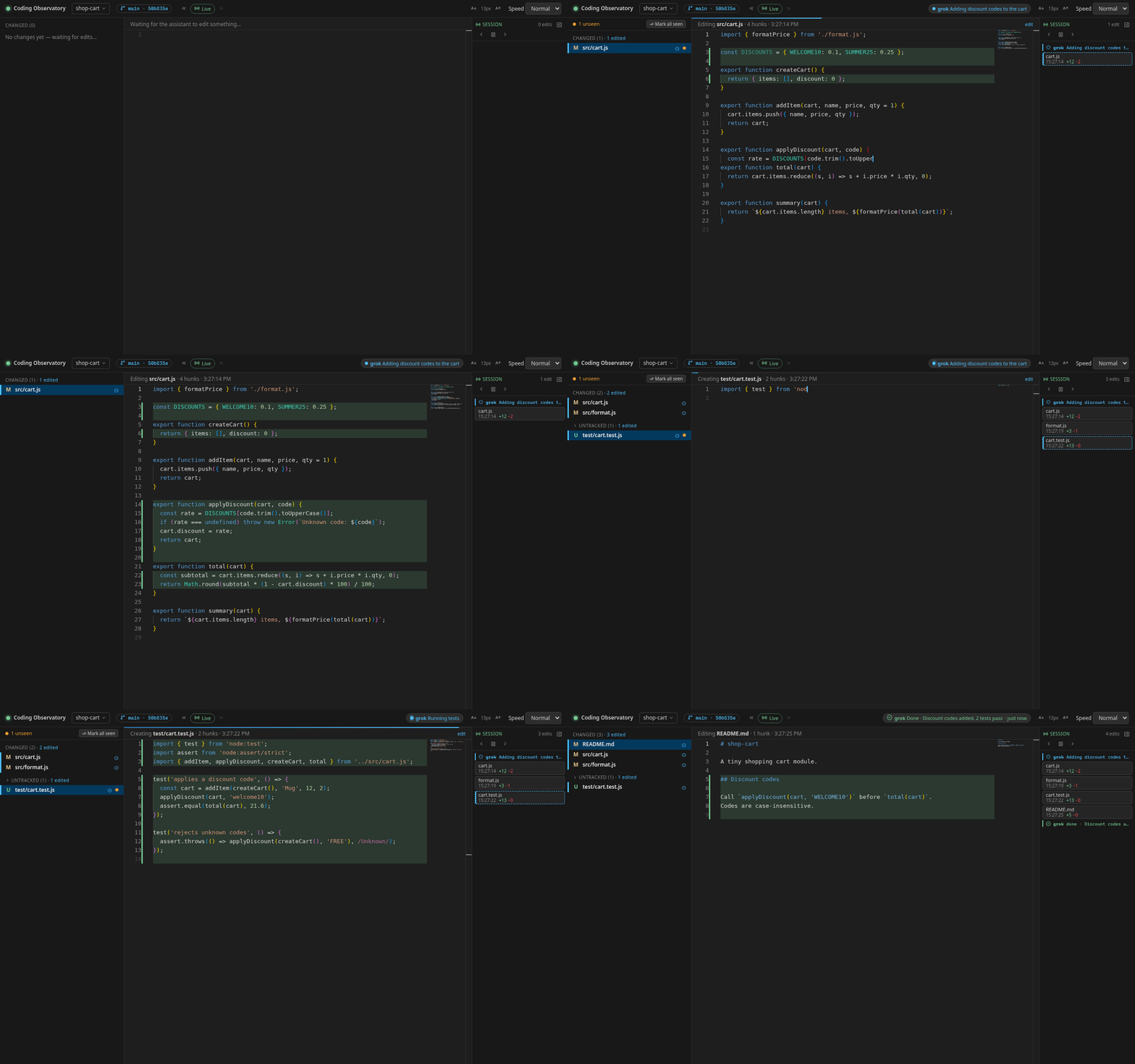
A five-step review workflow
-
Start from a clean tree. Commit or stash your own work first, or give
the agent its own branch. Then everything that differs from
HEADis the agent's work, and undoing it is onegit restoreaway. -
Watch it as it happens. Run
npx -y github:Eeliya/grok-coding-observatoryin the repo and open http://localhost:4477. Each saved edit replays live, so you notice a wrong direction after one file instead of twenty. - Replay what surprised you. The Session timeline keeps every edit in order. Click one to replay exactly that change, including intermediate versions the final diff no longer shows.
-
Check the whole change against
HEAD. The sidebar lists every changed and untracked file; click one for a side-by-side diff. Unseen dots and the since last look view show only what is new since you last checked. -
Commit what you understand. Stage with
git add -p, drop the rest withgit restore, and commit. Commits the agent made itself can be replayed file by file with the « / » buttons.
What to look for
- Files outside the task: config, CI workflows, unrelated modules.
- Deleted or weakened tests, skipped assertions, new
TODOs. - New dependencies and lock file churn.
- Hard-coded secrets, URLs or credentials.
- Error handling that swallows errors to make a test pass.
- Large rewrites where a small fix was asked for.
Ask the agent to report its progress too. With a few lines in AGENTS.md or
CLAUDE.md (see the
agent status protocol), the observatory shows what it says it is doing, like "Running tests", next to what
it actually changes, and markers in the timeline show when it said it was done.
FAQ
Can the observatory accept or reject changes?
No. It is deliberately read-only and never writes to your work tree. Use git for that: git add -p to stage what you keep, git restore to drop the rest.
Which AI coding tools does this work with?
Any tool that edits files in a git repo on your machine, for example Claude Code, Codex CLI, Cursor, Aider or GitHub Copilot's agent mode.
Does it review the code for me?
No, it doesn't judge the code. It makes changes easy to see and replay so that you can review them faster.
What does it need?
Node.js 22.6 or newer, git and a modern browser. On Windows, run it inside WSL.