
Open source · Local-only · MIT
Watch your AI coding assistant's edits replay live, file by file.
grok-coding-observatory is a small local web app. Point it at the git repo your assistant (for example Grok Bot) is working in, keep the tab open beside the chat, and every save shows up as a short replay: it jumps to the changed lines, highlights the removed ones and types the new code.
git clone https://github.com/Eeliya/grok-coding-observatory.git
cd grok-coding-observatory && npm install
npm start -- /path/to/your/repo   # open http://localhost:4477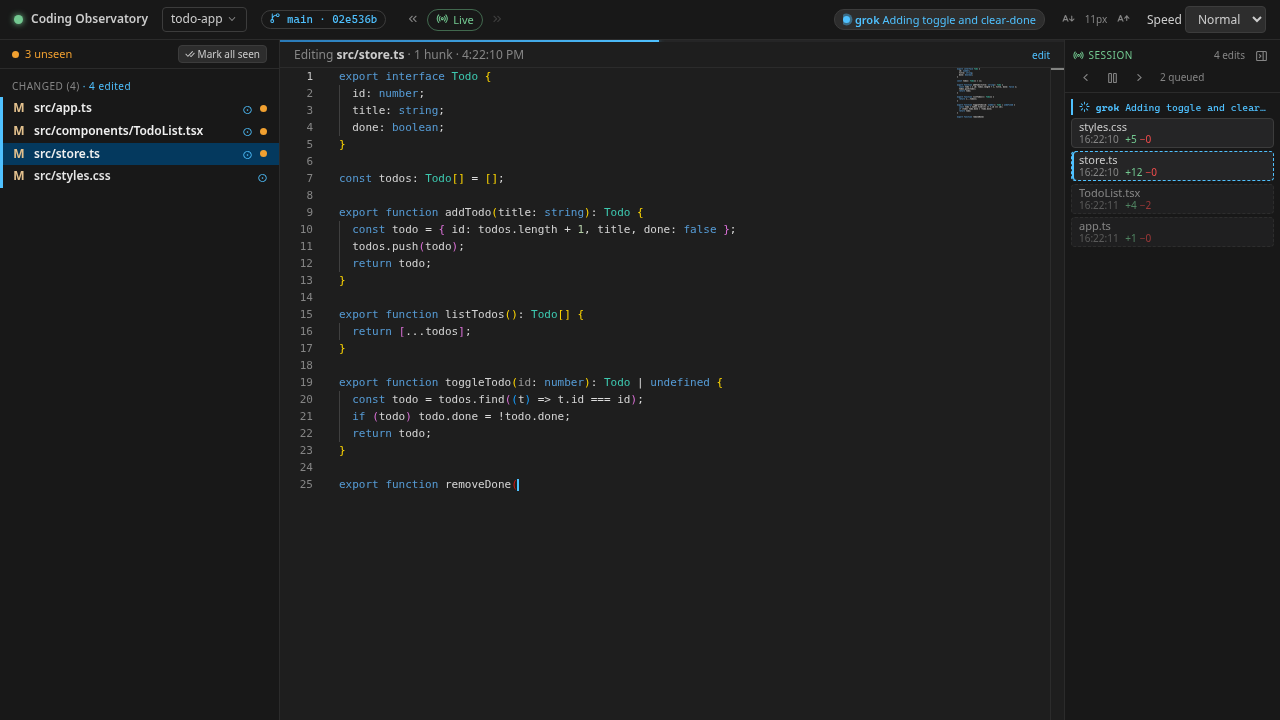
Features
Everything you need to follow along while an assistant edits your code, and nothing that touches it.
-
Live replay
Each saved change is replayed in order, nothing is dropped. Big changes, lock files and generated files appear instantly; a backlog fast-forwards. Choose the playback speed from Slow to Instant.
-
Diffs against HEAD
The sidebar lists files that differ from
HEAD, split into Changed and Untracked (git-ignored files never show). Click a file for a side-by-side diff. -
Unseen-change dots
An orange dot marks files that changed since you last looked. Mark all seen clears them, and the diff view can show only what changed since last look.
-
Session timeline with replay
A Session bar lists this session's uncommitted edits with time and +/− lines. Click one to replay exactly that edit. Commits, branch switches and agent status changes show as markers. It survives a refresh.
-
Pause and step
Pause live playback (new edits wait, with a count), then step through edits one at a time. Keyboard shortcuts: Space, ←/→, [/] and Esc.
-
Commit browsing and playback
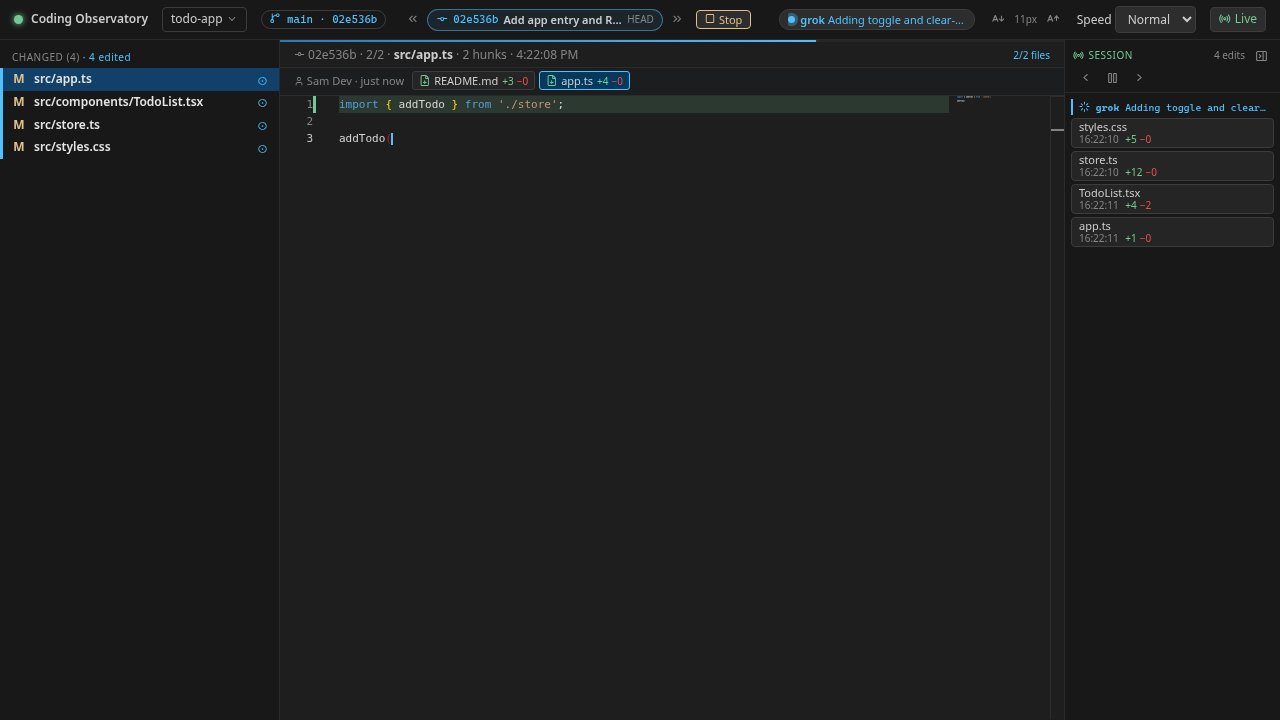
Walk the current branch's history with « / ». A commit plays back file by file with Play / Stop, or click a file for its diff. » on the newest commit returns to live.
-
Agent status chip
An optional chip per agent shows working (pulsing dot and message), done (✓ summary and age), possibly stalled or idle. It also prefixes the tab title with ⏳ / ✓ / ⚠.
-
Comfortable controls
A repo picker (recent repos, repos found under
~/work, or any path), A− / A+ code font size from 8 to 20 px, and playback speed. All remembered. -
Local and read-only
Binds to
127.0.0.1, reads your repo only through git and the file system, never writes to your work tree and never takes git locks. No build step.
How it works
-
Run it next to your repos
Start the observatory with
npm start -- /path/to/repo(on Windows: inside WSL). A Node.js server runs the TypeScript source directly and listens onhttp://localhost:4477. -
It watches git and the file system
A file watcher (chokidar) keeps a snapshot per file, tracks
HEADand branch switches, and computes line diffs for every save. Commit history is read from git, read-only. -
Your browser replays each edit
Changes stream to the page over a WebSocket. The page, a single static page with the Monaco editor, jumps to the changed lines, highlights what was removed and types what was added.
-
Your assistant can report its status
Optionally, the assistant writes a small JSON file into the repo's git dir. The header shows whether it is working, done or possibly stalled, even while it only runs lint, tests or git.
Quick start
You need Node.js 22.6+ (nvm use picks the version from
.nvmrc), git on your PATH, and a modern
browser with internet access (Monaco and the icon font load from jsDelivr). The folder
you watch must be inside a git work tree.
git clone https://github.com/Eeliya/grok-coding-observatory.git
cd grok-coding-observatory
npm install
npm start                          # then pick a repo in the browser
# or
npm start -- /path/to/your/repo    # watch that repo right away
Open http://localhost:4477. The last repo you
watched is remembered for the next npm start.
- macOS / Linux: run the commands in a terminal and open the URL in any browser.
-
Windows: run it inside WSL (Ubuntu etc.), next to your repos, and
open
http://localhost:4477in your Windows browser (WSL forwards localhost). Keep your repos in the WSL file system (~/…) for instant file events; repos under/mnt/c/…work too but are polled.
Everything else is optional: PORT, HOST,
TARGET_DIR, REPOS_ROOT and more can be set in the environment
or in a .env file. See the
configuration table
and
troubleshooting
in the README.
Agent status protocol
Let your assistant tell you whether it is busy or done, also while it only runs lint, tests or git. Tell it:
Follow docs/AGENT-PROTOCOL.md in grok-coding-observatory to report your status.
The agent writes one JSON file per agent to
<git dir>/observatory/status/<agent>.json
(inside the git dir, so it is never committed). Changes are picked up within about a
second, no server connection needed.
{
  "state": "working",
  "message": "Running lint",
  "agent": "grok",
  "ts": "2026-09-30T13:40:00Z",
  "ttl": 600
}-
state(required):"working","done"or"idle". -
message,agent,tsandttlare optional. A working status not refreshed within its TTL (default 10 minutes) shows as possibly stalled. -
Write it with plain
echoin bash, PowerShell, Node, the bundled CLI (bin/status.mjs) orPOST /api/statuson the running server.
FAQ
Does it send my code anywhere?
No. The server binds to 127.0.0.1, reads your repo through git and the
file system, and never sends your code anywhere. The page only fetches the Monaco
editor and the Lucide icon font from the jsDelivr CDN.
Does it change my repository?
No. It never writes to your work tree and never takes git locks. The only thing it
creates is the agent status folder .git/observatory/status/ inside the
git dir, which is never committed.
Which AI coding assistants does it work with?
Any assistant that edits files in a git work tree, for example Grok Bot. The
observatory watches the files, so the assistant needs no integration. The agent
status chip is optional: an assistant that follows
docs/AGENT-PROTOCOL.md writes a small JSON file to report whether it is
working or done.
Does it work on Windows?
Yes, run it inside WSL (Ubuntu etc.) next to your repos and open
http://localhost:4477 in your Windows browser; WSL forwards localhost.
Keep repos in the WSL file system for instant file events; repos under
/mnt/c work too but are polled.
What do I need to run it?
Node.js 22.6 or newer (it runs TypeScript directly, no build step), git on your
PATH, and a modern browser with internet access for Monaco and the icon
font. The folder you watch must be inside a git work tree.
Port 4477 is already in use. What now?
Another copy is probably running, so just open the URL. Or start on another port
with
PORT=4478 npm start.
Is it free?
Yes. grok-coding-observatory is open source under the MIT License.
Contributing
Contributions are welcome through the usual fork → branch → pull request flow. Found a bug or have an idea? Open an issue.
-
Fork the repository
on GitHub, then clone your fork and create a branch:
git clone https://github.com/<you>/grok-coding-observatory.git cd grok-coding-observatory git checkout -b my-change -
Install and run it against any git repo:
npm install npm start -- /path/to/a/repo -
Before pushing, run the checks:
npm run check # typecheck + prettier check + tests npm test # tests only npm run format # prettier --write . - Keep each change focused: one fix or feature per pull request, with tests where it makes sense.
-
Push your branch and open a pull request against
mainthat describes what changed and why.
Details are in CONTRIBUTING.md.