
grok-coding-observatory · Guide
See Codex CLI's changes in real time
Codex works through your code in the terminal and shows a diff when you ask for it. grok-coding-observatory shows every change while it happens, in a browser tab you can keep on a second screen.
# in the folder of your repo:
npx -y github:Eeliya/grok-coding-observatory   # open http://localhost:4477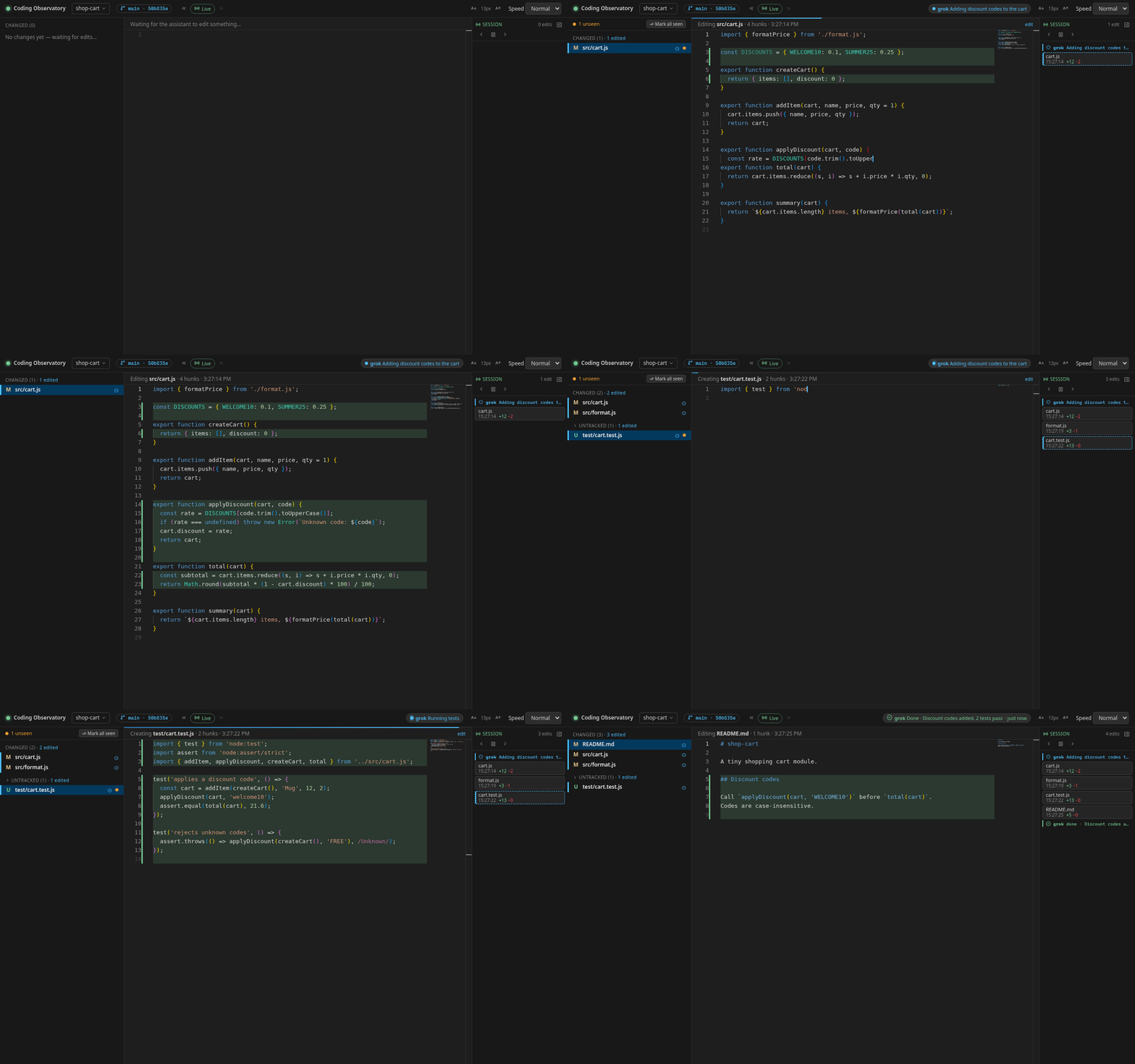
From "what did it change?" to watching it change
Codex CLI's /diff shows the current git diff, including new files. That
tells you where things ended up. It doesn't show the path there: the first attempt, the
partial revert, the second fix. When a run goes sideways, that path is exactly what you
want to see, ideally while there is still time to stop it.
The observatory watches your repo and replays each saved change in a code editor in your browser: it scrolls to the changed lines, highlights what was removed and types what was added. Every edit lands in the Session timeline with its time and +/− lines, and you can pause playback and step through edits one by one. Commits Codex makes appear as markers and can be replayed file by file.
Use it with Codex in three steps
-
Start it in your repo
In a terminal, in the folder where you run
codex, runnpx -y github:Eeliya/grok-coding-observatory. You need Node.js 22.6+ and git. On Windows, run it inside WSL. -
Open the page
Open http://localhost:4477 and keep the tab next to your agent, ideally on a second screen. It only listens on your own machine.
-
Let the agent work
Give your agent its task as usual. Every file it saves replays in the browser, and the Session timeline on the right fills up.
Let Codex report "working" and "done"
Codex reads AGENTS.md in your repo. Add this section and it will write a
status file the observatory turns into a chip in the header:
## Status for grok-coding-observatory
When you start a task, before a long command (tests, build, install) and when
you finish, run this from the repo root (use "done" and a one-line summary
at the end):

d="$(git rev-parse --path-format=absolute --git-path observatory/status)" && mkdir -p "$d" && echo '{"state":"working","message":"Running tests","agent":"codex"}' > "$d/codex.json"
Sandbox note: in its default workspace-write sandbox,
Codex keeps the .git folder read-only, and that is where the status file
lives. The live diffs work regardless, because the observatory reads your files itself.
For the chip, add your repo's .git path to
writable_roots under [sandbox_workspace_write] in
~/.codex/config.toml (this also lets Codex run git commands that write,
like commit), or skip the chip.
FAQ
Does it work with Codex cloud tasks?
Cloud tasks edit a copy in the cloud, so there is nothing local to watch while they run. When you apply the result to your repo (for example with codex apply), the changes appear in the observatory like any other edit.
Do I need to change how I run Codex?
No. Start the observatory in the same repo and keep using Codex as usual. Nothing is installed into Codex.
Does it also work with Claude Code, Cursor or Aider?
Yes. It works with any agent that edits files in a git repo, and it can show several agents' status chips at once.
Is my code sent anywhere?
No. The server binds to 127.0.0.1 and reads your repo through git and the file system. The page only loads the Monaco editor and an icon font from a CDN.